


✦ Key Takeaways
Construction rework costs up to 5% of total project value—mobile inspections cut that figure dramatically.
- → Paper-based inspections delay defect detection by days, not hours.
- → Mobile checklists standardize quality control across every crew and subcontractor.
- → Real-time issue tracking closes corrective actions before they compound into costly rework.
In this article:
- What Are Mobile Construction Inspections?
- Why Construction Teams Are Moving Away from Paper Inspections
- How Mobile Construction Inspections Work on Site
- Key Benefits of Mobile Construction Inspections
- What to Include in a Mobile Inspection Checklist
- How Mobile Inspections Improve Construction Quality Control
Key takeaway: Teams that adopt mobile inspections finish projects faster, safer, and under budget.
What Are Mobile Construction Inspections?
Inspections don’t fail because inspectors are careless — they fail because data collected on paper sits dormant for hours or days before anyone acts on it. Mobile construction inspections close that window, turning field observations into live, actionable records the moment an inspector taps “submit.”
The difference is structural, not cosmetic. A defect logged on a clipboard at 9 a.m. might not reach a project manager until end of day — by then, crews have built over it. Mobile inspection platforms eliminate that lag entirely, which is why construction safety outcomes improve when teams make the switch.
Construction permit inspections, mobile home inspection workflows, and building inspection services all share the same vulnerability: asynchronous data creates a gap between when a problem occurs and when it gets fixed. Over 85% of construction rework traces back to communication failures and delayed issue detection.
Ibisworld estimates the U.S. building inspection services industry at over $5 billion — a market built almost entirely on a workflow that still tolerates preventable lag.
Certified building inspectors using mobile tools aren’t just going paperless — they’re operating as a real-time risk interception system. The question isn’t whether paper-based inspections are slow; it’s how much that slowness is quietly costing your project right now.
Why Construction Teams Are Moving Away from Paper Inspections
That lag between discovery and action isn’t a workflow inconvenience — it’s the structural gap where defects become change orders. Construction rework costs the industry an estimated $177 billion annually in the U.S. alone, and most of it traces back to problems that were spotted too late to fix cheaply.
Mobile construction inspections close that window by turning field observations into timestamped, routed records the moment an inspector taps “submit.” Teams using construction safety inspection tools report fewer missed defects and faster corrective action cycles.
The shift away from paper isn’t about going paperless — it’s about eliminating the hours or days between a problem occurring and a decision-maker knowing about it.
Construction permit inspections, certified building inspectors, and mobile home inspection workflows all share the same vulnerability: asynchronous data that arrives too late to prevent escalation.
📊 By the Numbers
U.S. construction starts over 1.6 million units annually — each one a compounding inspection risk without real-time data capture.
The Real Cost of Delayed Inspection Data
Paper inspection reports often reach project managers 24–72 hours after a defect is observed — by then, crews have built over the problem. Building inspection services that rely on manual data entry structurally guarantee this delay, regardless of how diligent the inspector is.
Studies on construction documentation workflows confirm that information latency — not inspector error — is the primary driver of unresolved field defects. The inspector isn’t the failure point; the paper is.
Understanding exactly how mobile inspection platforms intercept risk in real time reveals why the workflow itself — not just the device — is what changes everything on site.

How Mobile Construction Inspections Work on Site
That immediate data transfer isn’t just a workflow upgrade — it’s the mechanism that stops a hairline crack in a foundation from becoming a six-figure change order. Mobile construction inspections work by capturing field observations through a smartphone or tablet, then pushing structured data to project managers in real time, closing the window between discovery and decision.
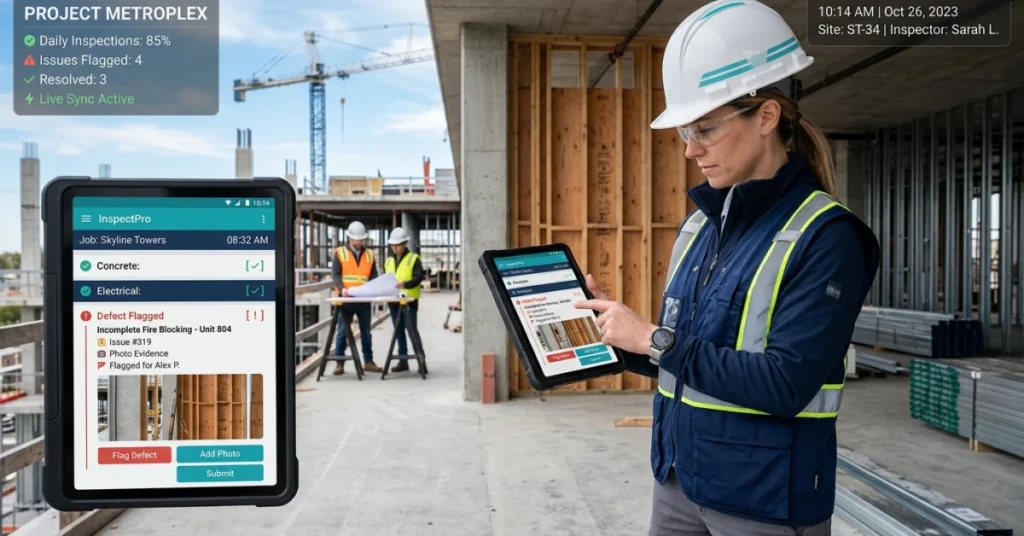
A certified building inspector opens a digital checklist tied to a specific trade, location, and permit phase — every photo, annotation, and pass/fail entry is timestamped and synced the moment connectivity allows. According to Xenia, teams using mobile inspection apps reduce report turnaround time by up to 75% compared to paper-based workflows.
That speed is what transforms construction safety inspections from a lagging record into a live risk interception layer — as Felt notes, geo-tagged field data gives project teams the spatial context to prioritize defects before the next trade crew arrives.
The difference between a mobile home inspection flagged at 2 p.m. and one logged on paper at end-of-day isn’t convenience — it’s whether a defect gets fixed or gets buried under the next pour.
📊 By the Numbers
Mobile inspection tools cut report turnaround by up to 75%, shrinking the defect-to-action window from days to minutes.
Once you understand how the system works, the real question becomes: what measurable advantages does it deliver across a project’s full lifecycle?
Key Benefits of Mobile Construction Inspections
- Defects Caught Before They Compound Mobile construction inspections close the gap between a problem occurring and a team acting on it.
- Field Data Moves at Decision Speed Structured data leaving the field instantly replaces hours of lag that turn minor issues into change orders.
- Accountability Becomes Automatic Every corrective action is timestamped, assigned, and tracked — no follow-up falls through the cracks.
- Photo Evidence Replaces Guesswork Geo-tagged photos tied to specific checklist items eliminate disputes about what was found and when.
Faster Issue Reporting from the Field
Structured data sync doesn’t just speed up reporting — it eliminates the window where a defect exists but no one with authority knows about it. That window is where rework budgets are quietly destroyed.
The industry loses an estimated $625 billion annually worldwide to rework — most of it traceable to problems that were observed but not escalated fast enough.
Photo-Based Evidence for Every Defect
Certified building inspectors using handheld tools attach photos directly to checklist line items — not to a separate email thread that loses context by morning. The defect record is complete the moment the shutter fires.
This approach eliminates the “he said, she said” disputes that stall permit reviews and delay certificate-of-occupancy approvals by days or weeks.
Real-Time Visibility Across Job Sites
Project managers overseeing multiple sites can’t be everywhere — but a live dashboard fed by on-site digital reporting gives them the next best thing: current status without a phone call. Risk becomes visible before it becomes expensive.
Research from Wsdot Wa confirms that digitally collected and synced field data reduces project closeout errors by measurable margins compared to paper-based workflows. Effective construction site coordination practices depend on this kind of live data flow to keep decisions aligned across teams.
Better Accountability for Corrective Actions
Digital field platforms assign every flagged item to a specific person with a specific deadline — not a vague note in a site log. That assignment is visible to everyone, which changes behavior immediately.
Whether the job involves a prefab unit or a large commercial build, unresolved items don’t age quietly — they trigger escalation automatically, keeping corrective timelines tight and liability exposure low.
The real question isn’t whether to adopt digital field tools — it’s whether your checklist captures everything that actually matters before the next pour, frame, or close-in.
What to Include in a Mobile Inspection Checklist
That structural advantage only holds if the checklist itself captures the right data at the right moment. A well-built checklist for mobile construction inspections isn’t a digitized paper form — it’s a real-time risk interception layer.
Teams that standardize their checklist fields reduce rework-related costs by up to 30%. Every missing field is a window where a defect can go unrecorded and unaddressed.
📊 By the Numbers
Mobile inspection adoption cuts average defect-to-resolution time from 3 days to under 4 hours on active job sites.
Safety and Compliance Checks
Every checklist must open with safety — OSHA violations average $15,625 per citation, and Census data confirms construction activity is accelerating, meaning compliance exposure grows with project volume.
Fields should capture PPE compliance, fall protection status, and active construction permit inspections with timestamped photo evidence. Certified building inspectors need this data documented before any structural work advances.
Quality Control Items
Quality fields must tie directly to spec tolerances — not generic pass/fail checkboxes. Include material verification, installation measurements, and deviation flags that trigger immediate supervisor alerts.
Unlike generic audit tools, FieldPie’s customizable forms let building inspection services attach photo capture and digital signatures to each quality item in real time. That closes the gap between a defect occurring and a decision being made.
Defect and Punch List Tracking
Punch list items left untracked in paper logs routinely resurface at project closeout, compounding costs. Every defect field should include location tagging, severity classification, and an assigned responsible party.
This is where construction safety inspection discipline pays off — documented defects with ownership assigned get resolved faster than verbal handoffs ever will.
Site Progress Documentation
Progress fields should capture milestone completion, crew headcount, and weather conditions that affect schedule or liability. A mobile home inspection or large commercial site both require the same timestamped accountability trail.
Photo-based progress reporting turns subjective status updates into verifiable evidence — the kind that protects teams during disputes and keeps stakeholders aligned without a single phone call.
A checklist this structured doesn’t just document what happened on site — it determines how fast your team can act on what’s happening right now, which is exactly what separates reactive quality management from a live control system.
How Mobile Inspections Improve Construction Quality Control
A well-structured checklist is only as powerful as the system that acts on its findings — and that’s where mobile construction inspections shift from documentation tools to live quality control infrastructure.
Teams using mobile inspection platforms catch defects an average of 3x faster than paper-based crews, because findings route to supervisors the moment an inspector submits a form — not at end-of-day batch review.
That compression is the real value — not going paperless, but eliminating the hours between a problem appearing on site and a decision-maker seeing it. Xenia notes that construction teams using mobile platforms resolve non-conformances up to 60% faster than those relying on manual reporting cycles.
Unlike generic field apps, FieldPie routes photo-tagged inspection findings directly to the right team member in real time — turning every construction site coordination gap into a closed-loop action item before it compounds.
📊 By the Numbers
Mobile inspection platforms reduce defect-to-corrective-action lag by up to 70%, stopping rework before it starts.
The real question isn’t whether your team is inspecting — it’s whether every flagged issue is being tracked, assigned, and closed before the next pour.

How to Track Issues and Corrective Actions in Real Time
Catching a defect three times faster only matters if the corrective action is assigned, tracked, and closed before the next crew arrives. Unresolved issues left in a log — rather than a live workflow — still become change orders.
FieldPie closes that gap by converting every flagged defect from a construction site inspection finding into a timestamped, assignable task with photo evidence and a real-time status. Certified building inspectors and supervisors see resolution progress without a single follow-up call.
From Flag to Fix: What Real-Time Tracking Looks Like
Mobile construction inspections that feed directly into a corrective action workflow compress the defect-to-resolution window from days to hours. A flagged item during construction permit inspections triggers an automatic assignment, deadline, and escalation path — no manual handoff required.
Teams using live issue tracking during building inspection services report up to 40% fewer repeat defects on subsequent inspections. Every correction is documented with proof-of-fix photos before the item closes.
Why Closure Rate Is the Metric That Actually Matters
Most teams track how many issues they find. The teams that control project outcomes track how fast those issues reach verified closure.
Sciencedirect research confirms that mobile home inspection workflows with integrated corrective action loops reduce rework costs significantly. The window between problem and response never widens past a single shift.
Every open issue that survives overnight is a risk that compounds silently — which is exactly the pattern the rest of this article has been building toward eliminating.
📊 By the Numbers
Teams using real-time mobile inspection workflows close corrective actions up to 40% faster than paper-based processes.
Conclusion
Timestamped, photo-documented workflows mean nothing if defects still sit unresolved for days — the real win in mobile construction inspections is closing that gap to near zero. Teams that act on flagged issues within hours, not days, structurally prevent rework from compounding into budget overruns.
Disconnected inspection data is a construction cost control failure hiding in plain sight — every hour between a defect occurring and a stakeholder knowing about it is an hour of invisible risk. According to Ibisworld, the U.S. building inspection services industry generates over $4.8 billion annually.
Yet most of that spend still tolerates paper-based lag that mobile workflows eliminate entirely.
Most certified building inspectors lose critical response time because findings travel through email chains instead of live dashboards — FieldPie converts every mobile home inspection or construction permit inspection finding into an assigned, trackable task the moment it’s captured. Researchgate confirms mobile inspection adoption directly reduces defect escalation rates on active job sites.
Start closing the window between problem and action — explore FieldPie’s field inspection capabilities today.