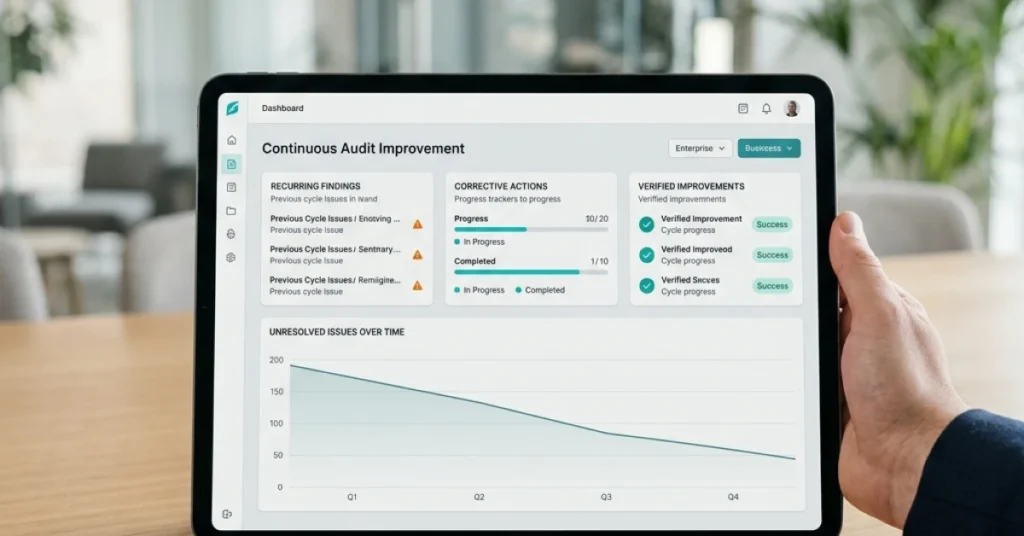




Audit workflow automation is the use of digital tools and rule-based logic to coordinate, execute, and track audit tasks — including evidence collection, task assignment, approval routing, and compliance monitoring — within a structured, repeatable system that reduces manual effort and human error.
What Is Audit Workflow Automation — and Why Does It Matter in 2026?
Manual audit processes are expensive, slow, and error-prone. Auditors spend an estimated 30–40% of their time on administrative tasks: chasing documents, sending status update emails, and manually logging findings into spreadsheets. That is time not spent on actual risk analysis.
For internal audit teams, tax departments, CPA firms, and revenue integrity organizations, the stakes are rising. Regulatory scrutiny is tightening. The IRS increased audit coverage of large corporations by 50% between 2021 and 2023.
PCAOB inspection deficiency rates remain stubbornly high. And organizations operating across multiple jurisdictions face compounding compliance obligations that no spreadsheet-based system can reliably handle.
Audit workflow automation solves this by replacing ad hoc, email-driven coordination with a governed digital system — one that assigns tasks, routes approvals, stores evidence, and generates audit trails automatically.
The result: faster cycle times, stronger defensibility, and measurable cost savings.
How Does Audit Workflow Automation Work?
At its core, workflow automation for audits operates on a trigger-action model. A defined event — a new engagement opening, a revenue threshold breach, a scheduled tax review date — triggers a pre-built sequence of tasks. Each task is assigned to the right person, tracked in real time, and escalated automatically if deadlines slip.
The five structural layers of a mature audit automation system are:
- Planning and scoping — Automated population of audit programs based on risk profiles and prior-year findings
- Evidence collection — Digital request lists sent to client or internal stakeholders, with secure storage and version control
- Review and approval routing — Multi-level sign-off workflows that enforce segregation of duties
- Finding management — Structured logging, classification, and remediation tracking for every issue identified
- Reporting — Auto-generated draft reports populated from structured finding data, reducing report-writing time by up to 60%
As complete guides to audit workflow automation note, firms that implement end-to-end engagement management see measurable gains in both realization rates and client satisfaction scores — two metrics that directly affect revenue.

What Are the Core Components of an Effective Audit Automation System?
Task Assignment and Ownership
Every audit step needs a defined owner, a due date, and a status. Automated task assignment eliminates the ambiguity that causes work to fall through the cracks. In larger organizations, role-based assignment rules route tasks based on staff credentials, availability, or engagement type — without manager intervention.
Centralized Evidence Storage
Document management is one of the highest-friction points in any audit. Teams waste hours searching for the right version of a workpaper or confirming whether a client has submitted a requested document. A centralized storage system with structured naming conventions, access controls, and automatic version tracking eliminates that friction entirely.
Secure cloud storage also supports remote audit delivery — a capability that has become non-negotiable for firms serving distributed client bases. According to Hyperbots‘ definition and process breakdown of audit workflow automation, coordinating evidence collection through standardized digital workflows keeps financial records accurate, transparent, and audit-ready at all times.
Compliance Monitoring and Audit Trail Automation
Every action taken within the system — a document upload, an approval click, a status change — is logged with a timestamp and user ID. This immutable audit trail is critical for regulatory defensibility. It is the difference between “we followed the process” and “here is documented proof that we followed the process.”
For tax and revenue-facing teams, this distinction carries real financial weight. A defensible audit trail can prevent costly penalties and support favorable outcomes in IRS or external auditor reviews.
Approval and Review Workflows
Multi-step review chains — senior auditor reviews, manager sign-off, partner approval — are enforced automatically. No workpaper advances to the next stage without the required sign-offs. This enforces quality control at scale and gives leadership real-time visibility into engagement status.
What Are the Top Benefits of Audit Workflow Automation?

1. Dramatically Shorter Cycle Times
Manual audit cycles for mid-size organizations typically run 8–12 weeks. Firms using structured workflow automation routinely cut that to 4–6 weeks. The gains come from parallel task execution, automated reminders, and elimination of wait time between handoffs.
2. Stronger Compliance Posture
Automated workflows enforce the same steps, in the same order, every time. There is no version of “we skipped that step because we were busy.” For internal audit functions governed by IIA Standards, and for CPA firms subject to AICPA or PCAOB requirements, consistency is not optional — it is a professional obligation.
As MDaudit’s research on compliance efficiency demonstrates, healthcare organizations using automated audit workflows see significant reductions in billing compliance errors and faster identification of revenue leakage — outcomes directly tied to the rigor of the underlying workflow system.
3. Measurable Revenue Protection
For revenue integrity and internal audit teams, every finding that goes undetected or unremediated represents a financial risk. Automated workflows accelerate finding identification, ensure remediation is tracked to closure, and create a feedback loop that informs future risk-based audit planning. Organizations that automate their audit programs consistently report improved recovery rates on revenue at risk.
4. Improved Client and Stakeholder Engagement
Client-facing audit requests — the infamous “PBC list” (Provided By Client) — are a notorious source of friction. Automated client portals send structured requests, track submission status, and send reminders without auditor intervention. This improves client engagement and reduces the back-and-forth that extends timelines and strains relationships.
You can learn more about how digital engagement management transforms field operations and why firms are replacing manual coordination with purpose-built platforms.
5. Scalability Without Proportional Headcount Growth
Workflow automation allows firms and internal audit departments to absorb more engagements without adding staff at the same rate. The system handles coordination, routing, and tracking — freeing auditors to focus on judgment-intensive work that actually requires their expertise.
Audit Workflow Automation: Key Metrics to Track
Implementing automation without measuring outcomes is a missed opportunity. Track these metrics from day one:
| Metric | What It Measures | Target Benchmark |
|---|---|---|
| Average engagement cycle time | End-to-end duration from planning to report issuance | Reduce by 25–40% within 12 months |
| Finding remediation rate | % of findings closed within agreed timeframe | >85% on-time closure |
| PBC request fulfillment time | Time from request to client document submission | <5 business days |
| Staff hours per engagement | Total auditor time per engagement type | Reduce by 20–30% within 12 months |
| Audit trail completeness | % of workflow steps with complete, timestamped logs | 100% — non-negotiable |
| Repeat finding rate | % of prior-year findings recurring in current cycle | Target <15% |
Tracking these metrics consistently allows audit leaders to demonstrate ROI to senior management, justify continued investment in automation, and identify which workflow segments still require optimization.
Frequently Asked Questions (FAQ)
What is the difference between audit workflow automation and audit management software?
Audit management software is a broad category that includes any digital tool used to plan, execute, or report on audits. Audit workflow automation is a specific capability within that category — it refers to the use of rule-based logic to automatically route tasks, trigger notifications, enforce approval sequences, and log actions without manual coordination. Not all audit management software includes true workflow automation; look for configurable workflow engines, not just task lists.
How long does it typically take to implement an audit workflow automation system?
Implementation timelines vary by organization size and complexity. A focused internal audit team deploying a purpose-built platform can be operational in 6–10 weeks. Larger organizations with multiple audit functions, complex ERP integrations, and extensive legacy data migration requirements typically require 4–6 months for a full deployment. Phased implementations — starting with one engagement type and expanding — consistently outperform “big bang” go-lives.
Is audit workflow automation suitable for small CPA firms, or is it only for large organizations?
Workflow automation delivers value at any scale. Small CPA firms benefit from standardized engagement templates, automated client request management, and built-in audit trails that support peer review requirements. Cloud-based platforms have eliminated the infrastructure costs that previously made automation inaccessible to smaller firms. Many vendors offer tiered pricing based on user count or engagement volume, making the technology viable for firms with as few as 5–10 staff.
Conclusion
Audit workflow automation is no longer a competitive differentiator — it is becoming a baseline operational requirement. Organizations that continue to manage audit programs through email chains, shared drives, and disconnected spreadsheets face compounding risks: longer cycle times, inconsistent quality, regulatory exposure, and an inability to scale without proportional cost increases.