✦ Key Takeaways · 6 min read
Perfect compliance may be out of reach, but field audits close the gap between policy and reality.
→ Undetected violations grow costlier the longer they go unseen.
→ Field audits reveal what desk reviews and self-reporting never can.
→ Technology transforms raw audit findings into a living compliance system.
In this article:
Field Audits Are Your Compliance Program’s Ground Truth
What Is the Difference Between Field Audits and Compliance Monitoring?
How to Conduct a Field Compliance Audit Step by Step
What Technology Tools Power Field Compliance Monitoring?
Turn Field Audit Data Into a Continuous Compliance System
Conclusion
Key takeaway: Field audits are not a checkbox exercise, they are your compliance program’s backbone.
What Is Compliance Monitoring Through Field Audits?
Compliance monitoring through field audits uses structured site visits to check whether daily operations meet defined requirements. Auditors record observations, document gaps, and feed findings into a process for correction and follow-up.
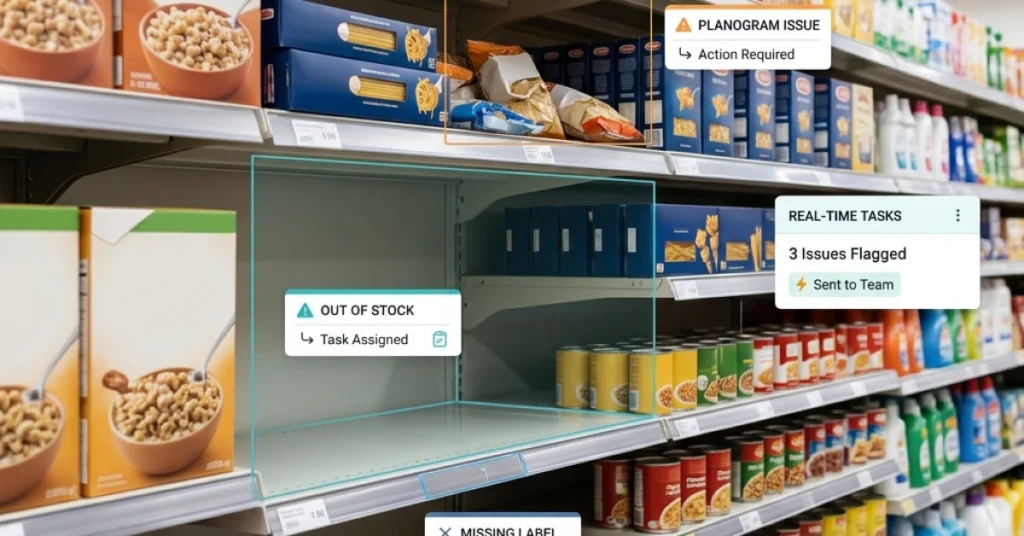
For example, a retailer requires promotional displays to follow an approved layout. During a visit, an auditor finds a display blocking the designated customer access area. The auditor records the requirement, documents the condition, and assigns the issue for correction. A follow-up check confirms whether access has been restored.
The visit provides evidence about conditions at that location and time. Monitoring brings those findings together across visits so managers can identify unresolved issues and recurring failures.
Field Audits vs. Compliance Monitoring
| Activity | What it does | Example |
|---|---|---|
| Field audit | Checks selected requirements at a location during a defined visit | An auditor compares a display with the approved layout and documents a blocked access area. |
| Compliance monitoring | Reviews results, exceptions, and corrective actions over time | A manager checks which sites have overdue findings or repeated failures. |
| Follow-up verification | Checks whether an assigned correction meets the requirement | A reviewer inspects a new photo or revisits the site before closing the finding. |
Use audit results alongside other relevant records, such as maintenance logs, training records, and system alerts. Schedule visits using a combination of routine coverage and risk signals. Repeated findings, operational changes, and overdue actions can justify additional checks.
How audits feed the monitoring cycle
Every field audit generates raw data that your tracking system can’t produce on its own. Say your team visits a retail location and finds that a required safety label is missing from three product displays. That finding enters your system, triggers a corrective action, and becomes a data point that shapes your next monitoring threshold.
Without the audit, the dashboard would show green when the situation on the ground was anything but. This is why real-time field compliance monitoring works best when it’s built on a foundation of structured, recurring site visits. Audits give your tracking tools something real to measure against.
When to audit vs. when to monitor continuously
Continuous tracking catches trends and flags anomalies, but it can’t replace the judgment of a trained person standing in a location. Use it daily to watch volume, frequency, and patterns across your field compliance program.
Schedule site visits when a location shows repeated flags or when you’re rolling out a new standard. A fixed rotation also helps so no site goes unseen for too long.
The two tools aren’t competing; they’re sequential. Tracking tells you where to look, and site visits tell you what you’ll find when you get there. Knowing exactly what to look for once you arrive is what separates a useful audit from a wasted trip.
How to Conduct a Field Compliance Audit in 5 Steps
1. Define the Scope and Requirements
Choose the locations, processes, and requirements the audit will cover. Identify the current policy, procedure, or applicable standard behind each check.
Turn broad requirements into observable questions. Instead of asking whether a display is “acceptable,” ask whether it matches the approved layout and leaves the designated access area clear. Define the pass criteria before the visit.
2. Assign Auditors and Plan Coverage
Assign auditors who understand the checks and can apply them consistently. Before rollout, have auditors assess the same example and discuss differences in their findings.
Set visit frequency using site risk, previous findings, operational changes, and any required inspection schedule. Review coverage so lower-risk locations also receive appropriate attention.
3. Capture Findings and Relevant Evidence
Record the location, audit date, requirement, observed condition, and result. Attach photos, measurements, or supporting records where they help explain the finding.
A timestamp or location tag adds context, but reviewers still need to check whether the evidence is relevant, clear, and linked to the correct finding. Record checks that could not be completed and explain why.
4. Assign Corrections and Escalate Issues
Give each finding an owner, a due date, and clear closure criteria. Follow the organization’s escalation procedure when a finding requires immediate attention.
Distinguish the immediate correction from action addressing the cause. Moving a display restores access. Updating setup instructions and checking other affected stores may help address a recurring layout problem. A structured audit follow-up workflow keeps the finding and its actions connected.
5. Verify Closure and Review Effectiveness
Review the evidence submitted after the correction. Depending on the finding, verification may require a new photo, a measurement, supporting records, or another site visit.
For recurring or higher-risk issues, check later whether the action remained effective. Record who verified the result and when. Reopen or escalate the finding if the closure criteria have not been met.

What to Look for in Field Audit Software
Test the software using one of your own checklists and a realistic failed check. Follow the finding from capture through assignment and verification.
| Capability | What to test |
|---|---|
| Checklist management | Can teams identify the correct checklist and version for the location? |
| Evidence capture | Can auditors attach photos, measurements, and notes to a specific check? |
| Offline working | Can auditors complete the required checks without connectivity and confirm synchronization afterward? |
| Corrective action tracking | Can managers assign an owner, set a deadline, and review overdue work? |
| Verification records | Can reviewers record the evidence, decision, and date supporting closure? |
| Reporting | Can managers filter findings by location, requirement, severity, and status? |
Check how quickly submitted findings reach the responsible team. The workflow should also make synchronization status visible when an auditor works offline.
Turn Field Audit Data Into a Continuous Compliance System
Capturing issues in real time is only half the job. The other half is making sure that data feeds back into your operations so the same problem never shows up twice.
Most teams treat each inspection as a standalone event. They visit a site, log findings, close the report, and move on. That cycle produces records, not improvement.
A structured field program treats every visit as one data point in a living system that gets smarter over time.
Say your team checks a retail location and flags a temperature storage issue. If that finding sits in a PDF, it helps no one. But if it triggers an automatic corrective action task, gets assigned to a responsible person, and feeds into a dashboard that tracks whether the fix held, you’ve built a feedback loop.
That loop is what separates a program that works from one that just looks good on paper.
Track resolution times and repeat violations
How fast a team fixes a flagged issue tells you more than the issue itself. Slow resolution times point to unclear ownership, missing resources, or a culture that doesn’t treat standards as urgent.
Repeat violations are the clearest signal your system is broken. If the same location fails the same check three visits in a row, the problem isn’t the employee. It’s a process gap that no one has addressed at the root.
Flag recurring failures in your tracking tool and escalate them on a fixed schedule, such as every second recurrence, so they don’t quietly pile up.
Set audit frequency based on risk, not habit
Checking every location on the same schedule feels fair, but it wastes resources. A site with a clean record for twelve months doesn’t need the same attention as one that failed its last two visits.
Use your inspection history to score locations by risk level. High-risk sites get more frequent visits, while lower-risk ones get lighter check-ins. This approach is the foundation of any serious retail compliance monitoring strategy, and it lets your team focus effort where it actually matters.
Here’s how the key components of a continuous system compare:
|
System Component |
What It Does |
Impact on Compliance |
Without It |
|---|---|---|---|
|
Corrective action tracking |
Assigns fixes to named owners with deadlines |
High |
Findings get logged but never resolved |
|
Repeat violation flagging |
Surfaces patterns across multiple audits |
High |
Root causes stay hidden and recur |
|
Risk-based scheduling |
Directs audit effort to highest-risk sites |
High |
Resources spread thin across all locations equally |
|
Resolution time monitoring |
Measures how fast issues get fixed |
Medium |
Slow fixes go unnoticed until the next audit |
|
Centralized audit dashboard |
Gives managers a live view across all sites |
High |
Compliance status is always a guess |
Each component above reinforces the others. Remove one and the loop breaks. A corrective action without a deadline is a suggestion, and a dashboard without risk-based scheduling is just a scoreboard with no strategy behind it.
FieldPie’s audit tools connect field findings directly to corrective action workflows and team tracking, so managers see both the problem and the fix in one place rather than chasing updates across separate systems.
A structured field program only becomes a real operational asset when the data you collect changes what you do next. It should actively shape the next visit, the next assignment, and the next decision your team makes.
The real question isn’t whether your audits are thorough. It’s whether you’d honestly know if your program stopped working tomorrow.
Conclusion
Start with one process and a defined set of checks. Record the requirement behind each finding, assign the correction, and specify what evidence is needed for closure. Review recurring issues to decide whether the procedure or the follow-up process needs to change.
Bring one of your existing checklists to a FieldPie demo. Walk through capturing a finding, assigning the next action, and reviewing evidence before closure. Book a demo.