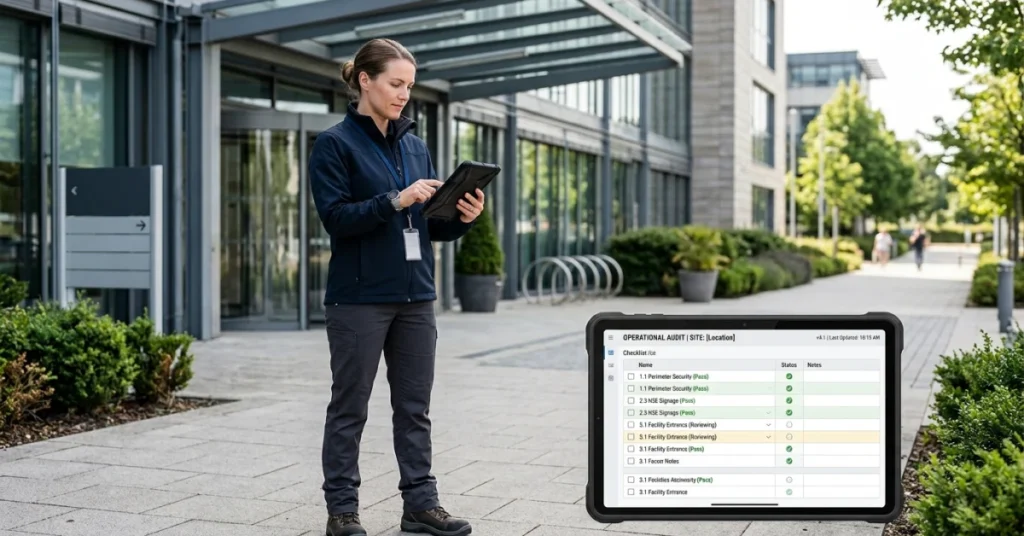




The safety audit software market is growing rapidly. Analysts estimate that it was worth about US$ 1.2 billion around 2025 and will reach US$ 2.5 billion by 2033, expanding at a compound annual growth rate of about 8.9 %. This growth reflects increasing regulatory pressures, rising workplace‑safety awareness and widespread digital transformation in industries such as manufacturing, construction, energy and healthcare. Many organisations still rely on spreadsheets and manual inspection tools; manual checklists and paper‑based inspections cause scheduling issues and delay corrective actions. Safety audit software brings compliance and risk‑management processes together in one place, helping companies measure compliance, manage inspections and tasks, and scale safety operations in a structured way. These platforms automate safety inspections, compliance checks, risk assessments and incident reporting, reducing missed audits and errors and enabling real‑time data capture and corrective workflows.
Why Your Safety Audit Program Needs Software
Organisations increasingly rely on digital audit and execution tools to stay efficient, compliant and scalable. Here’s why investing in safety audit software makes sense:
- Manual tools create delays. Paper forms and spreadsheets lead to missed inspections, delayed corrective actions and inconsistent record‑keeping. Real‑time platforms automate data collection and trigger corrective workflows immediately.
- Centralised software brings visibility and control. Safety audit platforms give leaders oversight across multiple facilities and teams, making it easier to schedule inspections, assign follow‑up tasks and track completion.
- Real‑time tools reduce errors and rework. Mobile apps capture photos, signatures and hazard data in the field; dashboards flag non‑compliance so issues can be addressed before they lead to accidents.
- Organisations using digital safety platforms operate more efficiently. By streamlining inspections and reporting, companies can focus on proactive risk management rather than administrative tasks.
What These Safety Audit Software Solutions Have in Common
While each platform offers its own focus, the tools in this list share a common mission: support efficient field safety operations at scale — from checklists to task assignment and reporting.
These platforms were selected because they:
- Replace manual tools such as spreadsheets, paper audits and text‑based coordination.
- Centralise scheduling and audit execution, connecting headquarters teams with field inspectors.
- Support customizable checklists, photo capture, offline mode and automated corrective actions.
- Improve operational visibility with real‑time dashboards and compliance analytics.
Together, these capabilities replace fragmented tools with a single system for safety audits and execution. This shared foundation helps organisations handle more sites, manage larger teams and scale without added complexity.

Top Safety Audit Software Solutions
This list highlights leading safety audit software solutions built for modern field operations. The platforms below support organisations in manufacturing, construction, energy and other high‑risk sectors by combining checklists, task management and reporting to help teams manage fieldwork and scale efficiently. Each solution supports different business sizes, from small networks to complex, multi‑region operations.
1. FieldPie
The Best Safety Audit & Field Execution Platform for Any Scale
FieldPie is a modern platform designed for safety audits and field operations. It supports teams of all sizes—from a handful of sites to companies with hundreds of facilities. By combining inspection planning, task management, customizable safety forms and real‑time reporting in a single system, it eliminates manual processes.
Core capabilities include:
- End‑to‑end field management: Plan inspections, assign corrective actions, conduct audits and close out incidents in one continuous workflow.
- Smart planning and route optimization: Mobile‑first workflows guide safety teams to high‑risk sites using GPS tracking and hazard history.
- Offline operation and synchronization: Collect photos, signatures, hazard reports and near‑miss forms offline, with automatic sync once connectivity is restored.
- Flexible safety audit forms: Fully customizable forms and checklists tailored to OSHA/ISO compliance, hazard identification and risk assessments.
- Real‑time visibility: Live dashboards provide insights into inspection status, location and safety‑performance trends.
- Role‑based permissions: Detailed access control for inspectors, supervisors and compliance managers.
- Comprehensive reporting: Operational and performance reports with detailed analytics—without requiring complex enterprise tools.
Where FieldPie stands out:
FieldPie is designed as a long‑term platform rather than a short‑term tool. It combines advanced field capabilities with a clean and intuitive user experience. It scales naturally from small teams to large distributed operations, improving operational efficiency through route optimization, offline inspections and customizable workflows. By consolidating multiple functions into one system, it reduces the need for separate safety‑management software.
Things to consider:
FieldPie focuses on field execution and operational excellence rather than niche add‑ons like marketing or campaign management. Organisations requiring specialised modules (e.g., environmental monitoring or enterprise risk management) should consider integration options.
2. GoAudits
GoAudits is a simple yet powerful audit solution for businesses transitioning away from paper and spreadsheets. Its mobile‑first approach speeds up safety audits and digitises inspection processes.
Core capabilities include:
- Flexible audit checklists: Customisable templates for health & safety inspections, hazard assessments and incident reporting.
- Mobile app with offline capability: Full functionality across devices, including offline data collection with photos and notes.
- Instant reports and analytics: Generate professional PDF reports with smart scoring and trend insights.
- Task management: Log issues, assign corrective actions and track resolution with evidence.
- Standardisation and communication: Define procedures and share updates across teams to reinforce safety protocols.
Where GoAudits stands out:
GoAudits offers a low barrier to entry for businesses adopting digital safety audits. Its simplicity, strong offline functionality and fast reporting provide quick value. It is particularly suitable for small to mid‑sized operations.
Things to consider:
Advanced automation, integrations and analytics are more limited. Larger enterprises or complex workflows may require additional tools.
3. Zenput
Zenput helps multi‑location businesses maintain consistent standards across facilities. It ensures operational priorities, safety protocols and brand standards are executed correctly and on time.
Core capabilities include:
- Standardised audits: Mobile checklists for collecting data, photos, temperature readings and ratings during safety inspections.
- Automated corrective actions: Automatically assign tasks based on inspection responses, with instant alerts for critical issues.
- Real‑time visibility: Compare inspection status and completion rates across all locations.
- Historical audit tracking: Identify recurring issues and training needs over time.
- Task and temperature monitoring: Manage food safety, facility compliance and environmental monitoring with integrated tracking and reporting tools.
Where Zenput stands out:
Zenput excels in compliance and operational standardisation. It ensures critical safety processes are executed and verified across large networks. Automated task creation based on audit results minimises operational gaps.
Things to consider:
Zenput can have a steeper learning curve, and advanced features may come at additional cost. Its structured approach may feel less flexible for smaller or simpler operations.

Your Strategic Roadmap: How to Choose the Right Safety Audit Software
Choosing the right safety audit software starts with understanding your operations, risk profile and growth goals. As teams scale, visibility into hazard data, incident history, inspection scheduling, routing and GPS tracking becomes just as important as core operations.
Must‑Have Features for Safety Audit Software
Industry benchmarks show that the most commonly used tools focus on customizable checklists, photo/video capture, offline mode and real‑time dashboards. The minimum you should look for includes:
- Customizable checklists – Drag‑and‑drop builders that adapt to regulatory requirements, company standards and industry‑specific hazards.
- Photo and video capture – In‑app media annotation for documenting non‑compliance with visual evidence.
- Offline mode – Full functionality without Wi‑Fi, syncing automatically when connectivity returns.
- Real‑time dashboards – Live compliance scores, trend lines and location‑level breakdowns accessible from any device.
- Role‑based access – Detailed permissions for inspectors, site managers, regional leaders and executives.
Beyond these basic features, advanced capabilities such as AI‑powered anomaly detection, IoT sensor integration, predictive analytics and natural‑language reporting separate good platforms from great ones.
How to Choose the Right Safety Audit Software
- Define core needs: Base your choice on your inspection workflows, facility count, risk profile and growth plans.
- Ease of use: A simple, intuitive interface ensures fast team adoption without heavy training.
- Scalability: The software should support more sites, teams and tasks as you grow; check user‑role granularity and multi‑region deployment.
- Support & training: Strong onboarding, documentation and responsive support make a real difference.
- Trials & demos: Always test the software in real scenarios before committing.
Conclusion: Choosing Software for Safety Audit Programs
The right safety audit software should support how your teams operate today while scaling seamlessly as your operations grow. While all tools on this list address core audit and compliance needs, FieldPie stands out by combining end-to-end field execution, real-time visibility and a clean, intuitive experience — making it equally effective for small teams and large, multi-site organisations.
See it in action. Schedule a FieldPie demo and explore real-world safety workflows, inspection management, corrective actions and compliance reporting.