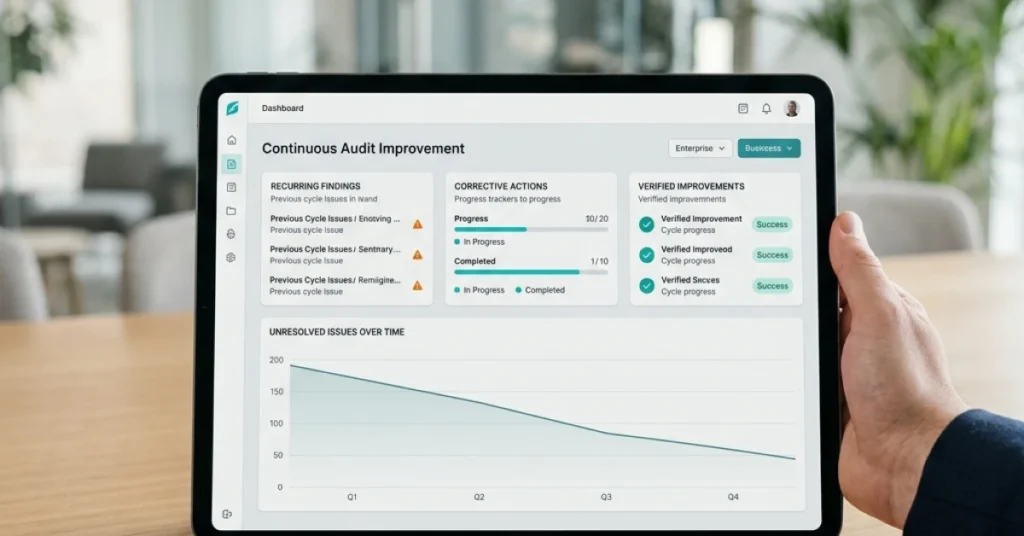




✦ Key Takeaways · 5 min read
→ Field audit corrective actions demand faster closure than standard CAPA.
→ Untracked findings silently compound into costly repeat violations.
→ Assigning ownership at the point of discovery cuts resolution delays dramatically.
In this article:
Why Field Audit Corrective Action Differs From CAPA
What Are the 5 Steps of a Field Audit Corrective Action Workflow?
Manual Tracking vs. Automated Workflow: A Direct Comparison
Corrective Action Workflow FAQs
Key takeaway: Automate your field audit corrective action workflow or watch the same problems resurface indefinitely.
Why Field Audit Corrective Action Differs From CAPA

A corrective action workflow for field audits ties a specific owner, deadline, and closure proof to every finding captured on a mobile device. CAPA was built for controlled lab or factory settings where one quality team manages the full cycle. That is a fundamentally different model.
CAPA frameworks assume centralized ownership. Field audits don’t have that luxury.
Say your team audits 40 retail locations in a week. Findings come in through a mobile app. Responsibility splits across district managers, store leads, and facilities crews, and closure requires a photo as proof. No ISO 9001 CAPA template was designed for that handoff chain.
That gap is exactly why so many AI corrective action agents are being built specifically for field contexts.
The Core Difference at a Glance
|
Factor |
CAPA (Quality Management) |
Field Audit Corrective Action |
|---|---|---|
|
Finding origin |
Lab test, production line |
Mobile audit app, on-site photo |
|
Ownership |
Central quality team |
Distributed field managers |
|
Closure proof |
Document sign-off |
Timestamped photo evidence |
|
Deadline logic |
Uniform review cycles |
Tiered by finding severity |
|
Escalation |
Manual quality review |
Automated, system-triggered |
This structural mismatch determines whether accountability is built into the process or left to individual initiative. Once you see the five steps a field-specific process actually requires, the gap between CAPA theory and field reality becomes hard to overlook.
What Are the 4 Steps of a Field Audit Corrective Action Workflow?
A purpose-built field workflow fixes the distributed ownership problem that ISO-style CAPA frameworks leave unsolved. Field audits run on tight cycles, and every day a finding sits unassigned is a day accountability erodes. The five steps below define exactly who acts, when, and what proof closes the loop.
Field audits can run daily, weekly, or monthly depending on your industry, and that cadence directly compresses corrective action timelines. A finding from a weekly retail audit must close before the next visit, or it becomes invisible noise. That pressure makes role clarity at each step non-negotiable.
Step 1: Capture and Categorize the Finding
The auditor logs the finding on-site, in real time, using a mobile audit app. Every finding gets a category (safety, compliance, merchandising, equipment) and a severity rating (critical, major, minor) before the auditor leaves the location. Categorization at capture is what makes automated routing possible downstream.
Who owns it: Field auditor via mobile app
The field auditor owns this step completely. They attach a photo, write a plain-language description, and confirm the category before submitting. No photo at capture means no baseline for verifying the fix later.
Step 2: Assign an Owner and Set a Deadline
Once a finding is submitted, the audit manager or site supervisor assigns it to a specific person, not a team or a role in the abstract. Assignment without a named individual is where most corrective action workflow field audits examples fall apart in practice.
Who owns it: Audit manager or site supervisor
The manager reviews the finding within hours of submission and assigns it directly. They also confirm the severity rating before the deadline is set. Changing severity at this stage is allowed, but it must be logged with a reason.
Setting deadlines by severity tier
Deadlines must match severity, not convenience. Applying the same deadline to every finding regardless of risk is a common reason audit corrective action plans lose credibility with field teams.
|
Severity |
Example |
Deadline |
|---|---|---|
|
Minor |
Missing shelf label on low-velocity item |
Before next audit |
Step 3: Investigate Root Cause
The assigned team member doesn’t just fix the visible problem. They document why it happened, using a simple method like asking “why” five times until they reach the process failure, not just the symptom. Say your team finds a refrigeration unit running warm: the fix is resetting the unit, but the root cause might be a missed weekly maintenance check that needs a process change.
Who owns it: Assigned field team member
The assignee submits a short root cause statement alongside their proposed fix. This step is what separates a corrective action workflow from a simple task list. Without it, the same finding reappears on the next audit, and the corrective action workflow field audits review cycle never actually improves outcomes.
Step 4: Submit Fix With Photo Evidence
The assignee corrects the issue and submits proof through the same mobile app used to capture the original finding. Photo evidence is not optional in a field context: it’s the only way a remote approver can verify closure without a return visit. This is where AI corrective action tools add real speed by flagging submissions that lack adequate photo quality before they reach the approver.
Who owns it: Corrective action assignee
The assignee submits the fix before the deadline and marks the finding as ready for review. Late submissions must include a reason, logged in the system, not sent by text or email. That log becomes part of the audit corrective action plan record.
What evidence is required to verify closure
A timestamped “after” photo from the same angle as the original finding
A written description of the action taken, in plain language
A root cause statement confirming what process change prevents recurrence
Any supporting documents, such as a maintenance log or updated checklist
Step 5: Verify and Officially Close the Finding
The approver reviews the submitted evidence and either closes the finding or sends it back with specific feedback. Closure must be a deliberate act by a named approver, not an automatic status change triggered by a submission. If the evidence is insufficient, the finding re-enters Step 4 with a new deadline, and the rejection reason is logged.
Who owns it: Approver or audit manager
The approver checks that the photo evidence matches the original finding location and that the root cause statement is specific enough to prevent recurrence. Once approved, the finding is officially closed and locked in the audit record. That closed record is what protects the organization during a compliance review or liability dispute.
The corrective action workflow in brief: Capture and categorize the finding. Assign an owner with a severity-tiered deadline. Investigate root cause. Submit the fix with photo proof. Verify and close with a named approver. Every step has a single owner, and no step is optional.
Most field operations teams that struggle with how to write a corrective action plan for audit findings aren’t missing knowledge. They’re missing a system that enforces each handoff without relying on someone to remember to follow up. The question worth sitting with is this: if your current process depends on a manager’s memory to move a finding from Step 2 to Step 3, what actually happens when that manager is traveling?

Manual Tracking vs. Automated Workflow: A Direct Comparison
Those five steps only hold up if the system enforcing them doesn’t depend on someone remembering to send a follow-up email.
When Manual Tracking Breaks Down at Scale
Say your team runs audits across 40 locations every month. Each finding gets logged in a spreadsheet, assigned by email, and tracked through a shared folder nobody checks consistently. By week two, three findings have no owner and two deadlines have passed. One site manager swears the issue was fixed but has no photo to prove it.
Manual corrective action workflow in field audits doesn’t fail because people are careless. It fails because the system puts the entire burden of follow-up on individual initiative. That’s a structural problem no spreadsheet can fix.
What Automation Handles Without Chasing People
An automated corrective action workflow assigns ownership the moment a finding is flagged in a mobile audit app. It sets a deadline based on severity and escalates on its own if that deadline passes. No one has to chase, because the system handles it every time, across every site.
AI corrective action agents are built to close exactly that gap. They replace the human memory layer with logic that runs whether or not anyone is watching.
Here’s how the two approaches compare across the factors that matter most in a field audit corrective action plan:
|
Factor |
Manual Tracking |
Automated Workflow |
|---|---|---|
|
Ownership assignment |
Manual, after audit debrief. Delays are common. |
Instant. Assigned at the moment of finding capture. |
|
Time to closure |
High variability. Depends on who checks the spreadsheet. |
Consistent. Deadlines are set by severity tier and enforced by the system. |
|
Escalation |
Reactive. A manager notices a missed deadline, if they notice at all. |
Automatic. System escalates to the next owner when a deadline passes. |
|
Evidence capture |
Inconsistent. Photos and notes stored separately, often lost. |
Built in. Photo proof attached directly to the finding record before closure. |
|
Audit trail for compliance |
Weak. Reconstructed manually before each audit cycle. |
Complete. Every action, timestamp, and owner logged automatically. |
|
Cost to access |
Low upfront. High hidden cost in staff time and missed closures. |
Entry-level tools start at Operandio pricing of $10/user/month for small and mid-sized teams. |
|
Multi-site visibility |
None without manual aggregation across files and inboxes. |
Real-time dashboard across all sites and all open findings. |
The real cost of manual tracking isn’t the spreadsheet itself. It’s every finding that aged past its deadline because no system forced a resolution. It’s every audit where your team had to rebuild the evidence trail from memory.
“A corrective action workflow for field audits only works if the system closes the loop automatically. If a human has to remember to follow up, the workflow has already failed.”
The practical difference shows up fast. With manual tracking, an audit corrective action plan lives inside someone’s inbox. With an automated workflow, it lives inside a system that doesn’t take days off, forget to escalate, or lose a photo attachment.
If your team is still weighing whether the switch is worth it, the answers are clearer than you might expect. The questions you’re already asking about corrective action workflow field audits point the way.

Corrective Action Workflow FAQs

When a system depends on memory instead of structure, the questions executives ask start to reveal the gaps. These FAQs cover the friction points that stall corrective action workflows in practice. They skip the abstract CAPA theory you find in an ISO manual.
What Are the 5 C’s of Audit Findings?
The 5 C’s give every audit finding a complete, actionable structure. Each element covers a distinct piece of the picture. Condition is what you found. Criteria is what the standard requires. Cause is why the gap exists, Consequence is what risk it creates, and Corrective Action is what fixes it. Without all five, findings stay vague and owners dodge accountability.
Say your team flags a refrigeration unit running above safe temperature at a retail location. Condition and consequence are obvious, but skipping “cause” means the fix targets the symptom, not the source. The finding then recurs within weeks.
How Do You Write a Corrective Action Plan for Audit Findings?
A solid corrective action plan documents the specific finding, assigns a named owner, and sets a deadline tied to finding severity. You also need a measurable closure condition so there’s no debate about whether the work is actually done. Vague language kills plans: “fix the display” fails where “reset planogram to brand spec and photograph by Friday” succeeds.
Tier your deadlines by risk. A food safety violation needs same-day closure, while a minor labeling gap can carry a five-day window. That tiering logic should live in your audit corrective action plan template, not in someone’s head.
How Do You Track Corrective Actions Across Field Locations?
Tracking across dozens of sites requires a system that pushes status updates rather than waiting for someone to pull them. Email threads and shared spreadsheets force a manager to chase every open item by hand. That manual chasing is exactly what retail corrective action tools are built to replace.
Automated escalation is the structural fix for this problem. If an action isn’t marked complete by its deadline, the system notifies the next level up on its own. That single mechanism removes the biggest reason corrective action programs collapse at scale.
How Often Are Field Audits Performed?
Frequency depends on risk profile and industry, but most multi-site operations run a mix of scheduled and unannounced audits. High-risk categories like food service or regulated retail typically need more visits than general merchandising accounts.
What matters more than raw frequency is closure rate between audits. Running audits every two weeks means nothing if findings from the previous cycle are still open when the auditor walks back in.
What Happens When Field Audit Actions Aren’t Followed Up?
Open findings age into liability. A review that shows repeat findings at the same location signals to regulators, insurers, and leadership that the program is decorative, not functional. That perception is hard to reverse once it forms.
Beyond compliance risk, unresolved findings erode field team accountability. When reps learn that no one checks closure, they stop treating audit findings as real work. The process breaks down not because of bad intent, but because the system never enforced follow-through.
Unresolved findings compound, and the cost of inaction grows with every audit cycle that passes without a closed loop. FieldPie’s audit module assigns findings to named owners, enforces severity-based deadlines, and triggers automatic escalation when actions go past due. FieldPie sells an AI-powered field operations platform that helps businesses manage scheduling, routing, audits, sales, merchandising, and team tracking from a single mobile-friendly tool.
Conclusion
Structure drives closure, and closure is the only metric that truly protects your operation from repeat findings. A disciplined corrective action workflow for field audits assigns clear ownership and tiers deadlines by severity. Automated escalation means follow-up never depends on someone checking a spreadsheet.
Picture your team flagging a refrigeration temperature violation at a retail site. The system should route that finding to the site manager within minutes and set a 24-hour resolution window. If that window closes without a confirmed fix, escalation happens automatically. No one has to chase it.
A written audit corrective action plan only works if the process runs on system logic, not individual initiative. Recurring audit findings patterns almost always trace back to manual handoffs that stall between steps. The problem is rarely a team that lacks effort or intent.
To write a corrective action plan for audit findings that holds up under pressure, remove every step that requires someone to remember something. If a task depends on memory or habit, it will eventually get missed. Build the reminders into the system itself.
Most field operations teams lose audit credibility because their corrective action workflow breaks down after the finding is logged. FieldPie routes findings directly to accountable owners, enforces deadline tiers by severity, and triggers escalation without manual input. FieldPie is an AI-powered field operations platform that helps businesses manage scheduling, routing, audits, sales, merchandising, and team tracking from a single mobile-friendly tool.