✦ Key Takeaways · 6 min read
Optimized route planning can increase customer visits by over 20%, without adding headcount.
→ Poor store prioritization silently kills merchandising team productivity.
→ Effective routes require real data, not gut instinct or habit.
→ Refreshing route plans regularly prevents costly coverage gaps.
In this article:
Why Merchandising Route Planning Fails in the Field
What Inputs Does an Effective Merchandising Route Plan Need?
How to Prioritize Stores and Build a Weekly Schedule
What Is the Best Route Planning Software for Merchandising Teams?
How Often Should Merchandising Route Plans Be Refreshed?
Conclusion
Key takeaway: Smart route planning is the single biggest lever merchandising teams refuse to pull.
Why Merchandising Route Planning Fails in the Field
Most scheduling failures don’t happen on the road. They get locked in the moment someone builds a schedule around a map instead of a priority list. A rep can drive the shortest possible path between ten stores and still miss every high-value account that needed attention first.
Store visit planning for merchandisers breaks down because teams treat it as a logistics problem rather than a sequencing problem. The fix isn’t a faster route, it’s a smarter order, built around which stores matter most on which days.
Windshield time vs. productive store time
Say your team has eight locations to cover in a day. If the schedule isn’t built around drive-time windows and store tiers, reps end up crisscrossing the same territory twice. That wasted drive time is time they’re not on the floor fixing displays, checking stock, or building relationships with store managers.
Structured field sales route planning can cut windshield time by up to 20%, according to Badgermapping, freeing reps for actual in-store work. That’s a meaningful shift, but only if the sequence was built around the right accounts in the right order to begin with.
How poor routes drive out-of-stocks and compliance gaps
When a rep visits a lower-priority location first thing Monday morning and runs out of time before reaching a top-tier account, that high-volume store goes unchecked. Out-of-stocks pile up, promotional displays stay wrong, and compliance gaps widen, not because the rep was careless, but because the schedule set them up to fail.
A field coverage approach that ignores account priority doesn’t just waste miles; it systematically under-serves the locations that drive the most revenue. The real question is what inputs a team needs to get the sequence right before worrying about mileage at all.
What Inputs Does an Effective Merchandising Route Plan Need?
Sequencing by priority only works if you feed the plan the right raw material. Most teams skip this step and hand reps a bare list of stores. There’s no context about which locations drive results, how often each needs a visit, or how much ground a rep can cover in a day.
That gap is where route planning for merchandising teams quietly breaks down, long before anyone checks a map. Without knowing which stores are high-volume, which have tight receiving windows, and which sit close enough to cluster, every route is just a guess dressed up as a plan.
The inputs you gather before building the schedule decide whether the plan holds up in the real world or falls apart by Tuesday.
Store classification, cadence, and rep capacity
Every store on your list needs a tier: high priority, standard, or low frequency. That classification drives visit cadence, so a flagship account might need weekly coverage while a smaller independent gets a biweekly check. Good field sales route planning starts with this store-level data, not with a mileage calculator.
Rep capacity is the other half of the equation. You need a realistic picture of how many quality visits one rep can complete per day, factoring in drive time, average time on the floor, and store access rules. Without that ceiling, you’ll build routes that look clean on paper but leave reps rushing through visits or skipping stores entirely.
Promotions, launches, and dynamic re-prioritization
A route built on static store data breaks the moment a new product launches or a promotional window opens. Merchandiser route optimization has to account for temporary priority shifts. A store that normally ranks low can jump to the top of the list when it’s running a featured display for a limited-time offer.
Teams that collect promotional calendar data upfront can adjust visit frequency before the week starts, not after a missed opportunity. The stores that need the most attention right now should shape the schedule, and that list changes constantly.
Once you know which inputs your plan needs, the next step is using them to rank stores and build a weekly schedule that holds up under real conditions.
How to Prioritize Stores and Build a Weekly Schedule
Once you have accurate store data in hand, the next decision is which stores earn a visit first, and that choice shapes everything downstream. Store priority sequencing is the step most merchandising teams skip, jumping straight to map routing instead. A perfectly efficient route to the wrong stores, visited in the wrong order, still fails the week.
Think of your store list as a ranked queue, not a geographic cluster. Sort each location by two factors: sales volume potential and the cost of a missed visit. A flagship account that resets a major promotion this Thursday outranks a smaller store two miles closer to the depot, every time.
That ranking logic is what consistent merchandising execution is actually built on.
Rank by sales potential and execution risk
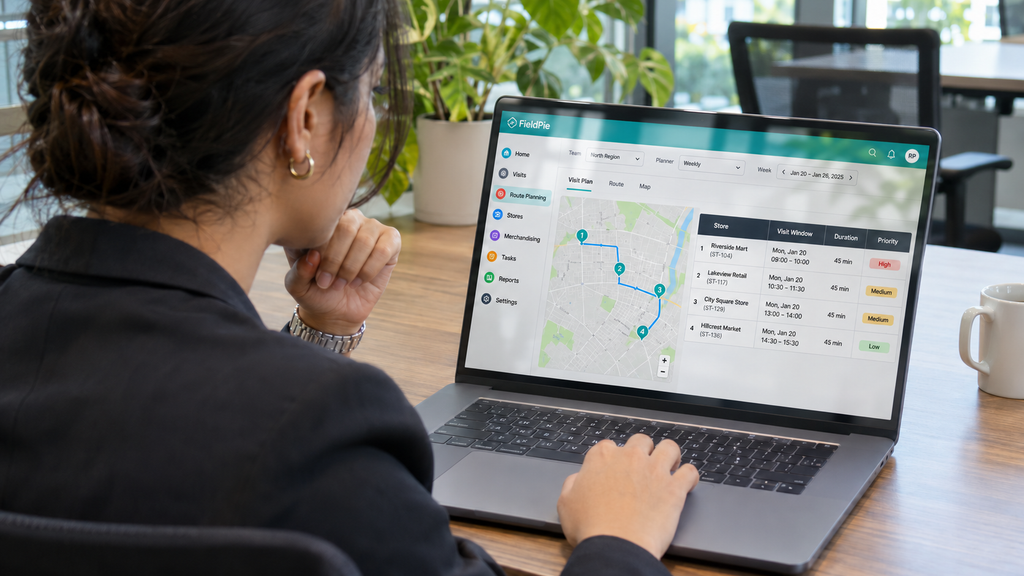
Assign each store a tier: high, medium, or low. High-tier stores carry the most volume or have the tightest compliance windows. They get locked into the schedule first, before any other stops are placed.
Execution risk matters as much as volume. A mid-volume store with a narrow receiving window, or a history of out-of-stocks, is a higher-priority stop than a stable high-volume store that runs itself. Build that judgment into your tier criteria so every rep applies the same logic, not their own gut feel.
Balance visit frequency with rep capacity
Once stores are ranked, map frequency to capacity. High-tier stores might need two visits per week; low-tier stores might need one every two weeks. Structured route planning for merchandising teams that locks in those frequencies prevents reps from over-serving easy accounts and under-serving critical ones.
According to Fieldpie, structured route planning cuts rep drive time by up to 20%, adding hours of selling time each week.
Build the weekly schedule in priority order and fill rep capacity from the top of the tier list down. Only after that should you fine-tune for geography. Mileage reduction is the final polish on a priority-first plan, not the starting point.
📊 By the Numbers
Structured route planning cuts rep drive time by up to 20%, adding hours of selling time each week., Fieldpie
Priority-first scheduling solves the planning problem. The harder question is how to enforce that logic consistently across every rep, every week, without relying on memory or spreadsheets.
What Is the Best Route Planning Software for Merchandising Teams?
Once you’ve ranked stores by priority, the next challenge is finding software that actually enforces that priority logic. Most general-purpose routing apps treat every stop as equal weight, which is exactly the wrong assumption for field merchandising route planning software.
The right tool lets you assign visit tiers, lock in high-stakes stores first, and then optimize mileage around that fixed priority order. Say your team has a Tier 1 reset at a flagship account due by 10 a.m. Good software protects that slot before it touches anything else on the day’s schedule.
📊 By the Numbers
The Route Optimization Software Market hit USD 8.48 Billion in 2025, per Marketresearchfuture. That number shows how fast teams are dropping manual scheduling.
Must-have features vs. nice-to-haves
Before you compare tools, separate what’s essential from what’s just impressive on a demo call. Store priority sequencing, rep capacity limits, and time-window constraints are non-negotiable for any serious store visit planning for merchandisers. Features like live traffic overlays or AI-powered suggestions are useful, but they fail you if the underlying priority logic is weak.
A good benchmark: check whether the software lets you set visit frequency rules by store tier, not just by geography. If it only groups stops by zip code, it’s a mapping tool dressed up as field merchandising software. It will quietly undo all the priority work your team just finished.
Even a well-built schedule loses its value the moment store conditions shift. Most field teams never formally decide how often to rebuild their routes from scratch. That gap costs them more than they realize.

How Often Should Merchandising Route Plans Be Refreshed?
Locking priority logic into your routes solves the structural problem. That structure starts to decay the moment a store changes its hours, drops a product line, or moves from a high-traffic location to a struggling one. A route plan that was accurate three months ago may now be sending reps to the wrong stores in the wrong order.
No amount of consistent merchandising execution fixes a plan built on stale data. The right refresh cadence depends on how fast your store mix changes.
Say your team covers a territory where two new accounts opened last month. One anchor store also cut its shelf space in half. That route needs a review now, not at the next quarterly planning meeting.
A practical rule of thumb is to audit your store priority tiers every four weeks. Rebuild affected routes right away when a high-tier store changes status.
Route planning for merchandising teams isn’t a one-time setup task. FieldPie’s AI-powered platform flags store-level changes as they happen, so teams can update priority sequencing before reps leave for the day. Catching the problem before the route starts beats finding it mid-route.
A plan that never gets refreshed is just a slow drift back to the same execution failures the team worked hard to fix.
Conclusion
Stale routes waste drive time and send reps to stores that no longer fit the plan. Every mile driven on an outdated schedule adds to the loss. A faster map is not the fix. The real answer is a smarter sequence built around store priority first, with mileage as the final adjustment.
Route planning for merchandising teams only works when the logic underneath it stays current. Say your team reviews store tiers every four weeks and rebuilds visit sequences before touching any mapping tool. That habit is called priority before proximity. It closes the gap between a route that looks efficient and one that actually moves product.
Check out mobile merchandising compliance tips to see how field execution connects to the planning decisions covered here.
Most merchandising teams lose ground because their field merchandising route planning software optimizes distance. Meanwhile, the store priority list sits untouched for months. Those two things need to move together. FieldPie enforces priority-first sequencing automatically, so reps visit the right stores in the right order before distance even enters the calculation.
FieldPie offers an AI-powered field operations platform. It helps businesses manage scheduling, routing, audits, sales, merchandising, and team tracking from one mobile-friendly tool.