



✦ Key Takeaways · 6 min read
Fewer than 1 in 4 retailers hit 80%+ shelf accuracy, and half are losing sales because of it.
→ Poor planogram compliance silently erodes brand revenue and shopper trust.
→ Digital shelf audits expose execution gaps that store visits routinely miss.
→ Fixing compliance starts before the reset, not after the damage is done.
In this article:
Seven Failure Modes That Kill Planogram Compliance
What Does Digital Shelf Mean for Planogram Audits?
Which Audit Signal Catches Each Failure Mode Earliest?
Pre-Visit and Post-Reset Verification Checklist
FAQ: Digital Shelf Planograms and Compliance Audits
Conclusion
Key takeaway: Retailers who automate digital shelf audits win the compliance battle their competitors keep losing.
Seven Failure Modes That Kill Planogram Compliance
Seven problems destroy planogram compliance: reset drift, out-of-stock masking, unauthorized substitutions, sequence inversion, phantom facings, fixture creep, and promotional override. Each is a distinct operational breakdown with its own root cause. Each leaves a specific photographic signal you can catch before it spreads across a full reset cycle.
Most compliance programs catch these issues after the fact, scoring dashboards against what a shelf looked like last week. The teams that protect revenue are the ones who’ve named each breakdown and know exactly which shelf photo reveals it first.
Reset Drift, OOS Masking, and Five More
Out-of-stocks alone cost retailers $1.2 trillion globally (form.com), and that figure only counts the shoppers who left empty-handed. It doesn’t count the sales lost when a wrong SKU sits in a slot, a shelf gets repositioned without approval, or a temporary display quietly becomes permanent.
Every one of these problems has a name, a mechanism, and an earliest detectable signal. Good planogram compliance solutions treat them as separate issues, because fixing them requires different actions at different points in the visit cycle.
1. Reset Drift: Facings Shift Between Visits
Products migrate. Stockers push items to fill gaps, and over days, a four-facing SKU quietly becomes two. Take a timestamped photo right after the reset. Compare facing counts on day one versus day five, and the drift shows up before it costs you a full cycle.
2. Out-of-Stock Masking: Empty Space Hides Violations
When a shelf goes empty, neighboring products spread out to fill the gap. The shelf looks full in a photo, but the digital shelf planogram shows a missing SKU. Auditors who only check for empty space miss this entirely.
3. Unauthorized Substitutions: Wrong SKU, Right Slot
A store associate swaps a discontinued item for a similar one from a different brand or size. The slot is filled, the shelf looks correct, but the planogram strategy is broken. SKU-neighbor analysis in shelf photos catches this: if the product to the left doesn’t match the expected adjacency, something is wrong.
4. Sequence Inversion: Products Swapped Within a Block
Two SKUs within the same brand block trade places. Sales data won’t flag it because both products are present and stocked. Only a photo checked against the approved visual merchandising planogram reveals the swap.
5. Phantom Facings: Product Present, Count Wrong
The right SKU is on the shelf, but it’s been stacked two deep instead of spread across three facings. Shopper visibility drops, but the audit scores it as compliant because the product exists. Facing-count deltas between visits expose this fast.
6. Fixture Creep: Shelves Repositioned Without Authorization
A store moves a shelf up or down by a few inches to fit a local display. The retail shelf planning spec is now void for every product on that section. Shelf-edge height measurements in photos, compared against the approved fixture diagram, catch this before a full reset bakes it in.
7. Promotional Override: Temporary Display Never Removed
A promotional end-cap or secondary placement goes up for a two-week event and stays for two months. The permanent shelf loses its space, and the brand’s core retail shelf planning gets crowded out. A date-stamped photo from the day after the promotion ends is the audit signal that proves the override is still active.
Each of these seven problems is invisible to a scoring dashboard that only reviews a shelf after the fact. If your audit captures a photo but doesn’t know which specific issue to look for, the damage compounds quietly. By the time anyone reviews the image, you’ve already lost ground you didn’t need to lose.

What Does Digital Shelf Mean for Planogram Audits?
The digital shelf is a photo-based, data-linked record of what your shelf looks like right now. It catches planogram drift the moment a facing shifts or a SKU disappears. That means you find the problem in hours, not weeks later when a compliance score finally surfaces the damage.
Say your team resets a beverage aisle on Monday; by Thursday, a stocker has swapped in a house brand where a national SKU should sit. A digital shelf planogram flags that swap as a neighbor anomaly in the next store visit photo. It catches the error before the reset cycle ends and before the mistake spreads across every door.
Most audit tools score what the shelf looked like after the fact. The digital shelf flips that logic by giving field teams a live visual reference. They can compare what is against what should be at the exact moment they stand in the aisle. That shift from after-the-fact scoring to real-time comparison is what makes planogram execution tools useful in the field, not just in a report.
Realogram vs. Planogram: The Compliance Gap
A planogram is the intended shelf layout. A realogram is a photo of the actual shelf. The gap between those two images is where retail shelf planning breaks down and revenue quietly leaks. Out-of-stocks can mask facing counts, unauthorized substitutions hide behind similar packaging, and reset drift grows with every unverified replenishment cycle.
Closing that gap requires more than a weekly store walk. The field rep’s photo must be measured against the approved visual merchandising planogram, SKU by SKU. That check needs to happen before they leave the store.
How Image Recognition Catches Drift First
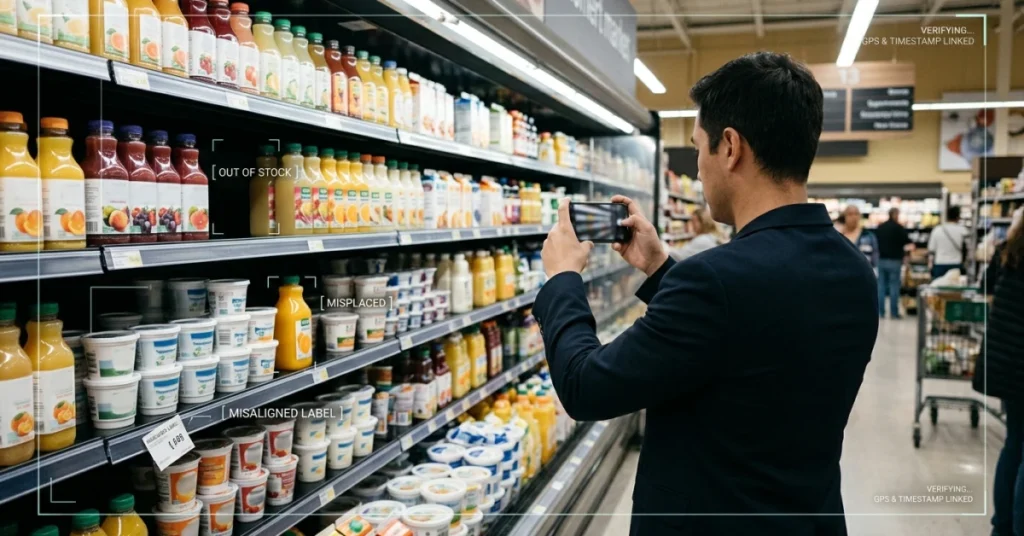
Image recognition software reads shelf photos and flags gaps automatically. It can spot a missing facing, a wrong product in a slotted position, or a shelf-edge label that no longer matches the SKU above it. These are the earliest photographic signals each failure mode leaves behind. They show up in the photo before any compliance dashboard registers a problem.
Your team’s real question is not whether these signals exist. It’s which specific signal maps to which failure mode at its earliest detectable moment.

Which Audit Signal Catches Each Failure Mode Earliest?
Catching drift after a reset cycle ends is already too late.
Each failure mode has a distinct photographic fingerprint. A digital field audit catches that fingerprint at the shelf edge, before a single wrong facing multiplies across a bay.
What Field Teams Actually Photograph Per Visit
Most field reps photograph the center of a bay and call it done. That habit skips the two spots where failure starts first. The shelf edge is one: price tags there reveal unauthorized substitutions early.
The top shelf is the other problem area. Slow movers get quietly moved up there to hide an out-of-stock on the shelf below.
Say your team photographs only three bays per store visit. If those bays don’t include the reset boundary, reset drift goes undetected until the next scheduled audit, often weeks later.
How Visit Frequency Interacts With Drift Rate
The faster a category turns, the faster a planogram drifts.
Visit frequency must match drift rate, not store count. A weekly visit to a high-velocity account catches drift before it builds up. Go biweekly to that same account and you’ll almost always score a shelf that’s already two failure modes deep.
|
Failure Mode |
How Fast It Degrades |
Earliest Audit Signal |
|---|---|---|
|
Out-of-stocks masking facings |
Same day as stock-out |
Facing-count delta between visit photos |
|
Unauthorized substitutions |
Immediate; often done at reset |
SKU neighbor anomaly in shelf photo |
|
Phantom inventory blocking reorders |
Compounds over days to weeks |
Photo showing empty peg with system showing “in stock” |
|
Price tag misalignment |
Immediate post-reset |
Shelf-edge label photo matched to SKU position |
|
Secondary placement loss |
Within one promotional cycle |
Wide-angle aisle photo showing display absence |
|
Vertical block collapse |
Gradual; visible by day 3 to 5 |
Full-bay vertical photo vs. approved block layout |
The digital shelf planogram framework turns these signals from reactive scores into live triggers. AI-assisted shelf detection models now reach precision levels that make automated signal-catching practical at scale. Research published by Pmc Ncbi Nlm Nih confirms this: shelf detection hit 99.23% precision and 98.93% recall, surpassing transformer-based alternatives.
Knowing which signal to look for is only half the answer. The real question is whether your team captures that signal before the visit ends, and that depends entirely on what your pre-visit and post-reset verification steps actually require them to do.
📊 By the Numbers
For shelf detection, the model achieved 99.23% precision, 98.93% recall, and 99.41% mAP@50, surpassing transformer-based alternatives such as Deformable DETR. (Pmc Ncbi Nlm Nih)
Pre-Visit and Post-Reset Verification Checklist
Those shelf-edge fingerprints only matter if your team knows exactly what to photograph, and when, before and after every reset.
Start with two distinct photo captures. Take one before the reset begins to document the current state. Take a second within two hours of completion to catch substitutions and facing-count drift before the next sales cycle starts.
Assign each capture to a named rep in your mobile app, with a timestamp requirement and a bay-section tag.
Pre-Visit Verification Steps
Run these checks before your rep touches a single product. They set the baseline your post-reset audit compares against.
Pull the current digital shelf planogram: Confirm the rep has the approved schematic for that bay and store format loaded on their device.
Photograph full bay width, shelf by shelf: Capture every shelf from left edge to right edge, not just the center facings where compliance looks clean.
Flag existing out-of-stocks before the reset: Record empty slots now so post-reset photos don’t misread a pre-existing gap as a new compliance failure.
Note any unauthorized substitutions already on shelf: A competitor SKU sitting in your planogram slot is a retail shelf planning issue that predates your visit.
Confirm shelf-edge label accuracy: Price tags and SKU labels that don’t match the visual merchandising planogram point to a prior reset drift that never got corrected.
Post-Reset Verification Steps
These checks close the loop. Run them within two hours of finishing the reset, while the rep is still on-site and corrections cost minutes, not a return visit.
Re-photograph every shelf at the same angle: Matching the pre-visit shot angle makes facing-count differences visible at a glance during review.
Count facings against the approved schematic: A one-facing shortfall on a high-velocity SKU compounds fast, so catch it now.
Check SKU neighbors for sequence drift: Products placed one slot out of order are the earliest sign of drift before it spreads across the bay.
Confirm shelf-edge timestamps are updated: A mismatch between the label date and the reset date is a documented audit signal, not a minor admin issue.
Submit photos with bay-section tags before leaving: Untagged photos can’t be routed to the right category manager, so they sit unreviewed and the failure compounds.
Assign Steps Inside a Mobile App (FieldPie)
Say your team manages resets across forty stores in a single week. Emailing checklists and collecting photos through a shared drive means you’ll review them two days after the reset window closes, when corrections require a second visit.
A mobile field execution app like FieldPie lets you assign each step to a specific rep and require a timestamped photo at each one. It also flags incomplete submissions before the rep leaves the store, so nothing slips through unnoticed.
The strategy only holds if the loop closes on the same day as the reset. Assigning steps inside the app turns this from a document into an enforced workflow. Every incomplete step surfaces as an alert, not a discovery made during a weekly dashboard review.
Rule of thumb: If a rep can’t complete the post-reset photo submission before leaving the store, the confirmation didn’t happen. Build the app workflow so submission is the last required step before check-out.
The steps above tell you what to capture and when. Harder questions don’t have obvious answers until you’ve seen them go wrong in practice. What counts as a violation, who owns the correction, and how often to re-audit all take real experience to settle.

FAQ: Digital Shelf Planograms and Compliance Audits
Those two checkpoints are the foundation, but the questions that follow show where most teams still get stuck.
What is a digital shelf planogram? It’s a data-linked visual map of your shelf. It ties each SKU position to a live compliance signal, not a static diagram with no feedback loop.
How is it different from a printed planogram? A printed plan shows intent; a mobile merchandising compliance workflow shows what the shelf actually looks like after the reset.
What is planogram strategy? It’s the decision logic behind which SKUs go where, based on velocity, margin, and shopper flow, so every facing earns its space.
What causes unauthorized substitutions? A rep swaps a slow mover for a faster one without approval. No photo audit catches the SKU neighbor anomaly before the next reset cycle.
Can out-of-stocks mask facing counts? Yes. An empty slot can look compliant on a dashboard. A timestamped photo reveals the gap between the recorded facing count and the actual shelf state.
What does retail shelf planning require at the field level? Reps need a pre-visit reference image, a post-reset photo with a timestamp, and a clear escalation path when the shelf doesn’t match the plan.
How Often Should Planogram Compliance Be Audited?
Audit frequency should match your reset cycle, not your reporting calendar. Say your team resets a category every four weeks. A single end-of-period audit lets reset drift build silently for nearly a month before anyone catches it.
This catches facing drift and unauthorized substitutions at their earliest detectable moment, before they cost you a full sales cycle.
How Do I Build a Reset Verification Process?
Use three steps in fixed order. First, capture a pre-reset photo against the approved visual merchandising planogram. Then run the reset and capture a rep-assigned post-reset photo with a timestamp.
FieldPie’s AI-powered audit workflow automates the photo assignment and flags shelf-state deviations before they reach a manager’s desk. The process only holds if every rep follows the same sequence on every visit.
Inconsistent photo coverage is the single gap that lets substitution errors and facing drift survive undetected across multiple reset cycles.
Every failure mode in this article has a detectable signal. Teams that name each gap and assign a specific audit step to it will catch problems early. Those that don’t will see them compound into lost sales.
Conclusion
Closing the loop between shelf intent and shelf reality means naming the exact moments where compliance breaks. Scoring what auditors find after the fact is not enough. Reset drift, unauthorized substitutions, and out-of-stocks masking facings don’t announce themselves on a compliance dashboard. They show up first in photographic signals that most field teams walk right past. A retail shelf audit approach built around those early signals catches failure before it compounds across an entire reset cycle.
If facing counts drop and SKU neighbors shift without a planned change, that’s reset drift in its earliest detectable form. It’s fixable before the next store visit, but only if someone spots it in time. A digital shelf planogram gives field teams a clear reference point to catch that gap on the spot. Without one, the damage often doesn’t surface until it’s already in the sales data, weeks later.
Most retailers lose compliance in the operational gaps between resets, not during them. FieldPie’s AI-powered audit tools let field teams photograph shelves and flag deviations against the live planogram. Each gap is tied to the specific failure mode driving it. FieldPie sells an AI-powered field operations platform that helps businesses schedule, track, audit, and manage field teams. It serves industries like retail, home services, and distribution.